Trainin processes online payments through Mollie. Clients pay with, for example, iDEAL | Wero, Bancontact or credit card, and the money arrives in your own Mollie account.
1. Creating a Mollie account
Don't have a Mollie account yet? Create one on the Mollie website. For that you need a website with:
- terms and conditions;
- the services you offer;
- your company details (Chamber of Commerce number and VAT number);
- your contact details (address, email address and phone number).
You can also use your company profile in Trainin as your website.
2. Turning on payment methods in Mollie
In your Mollie dashboard, turn on the payment methods you want to offer. If you want to collect membership fees automatically, also turn on SEPA Direct Debit (called SEPA domiciliëring in Belgium). Mollie has to approve a payment method before you can use it.
3. Connecting Mollie to Trainin
- Go to Settings → Billing & payments → Payment settings.
- Under Mollie Connect, click Connect Mollie account.
- Log in to Mollie and give permission. You are then taken back to Trainin automatically.
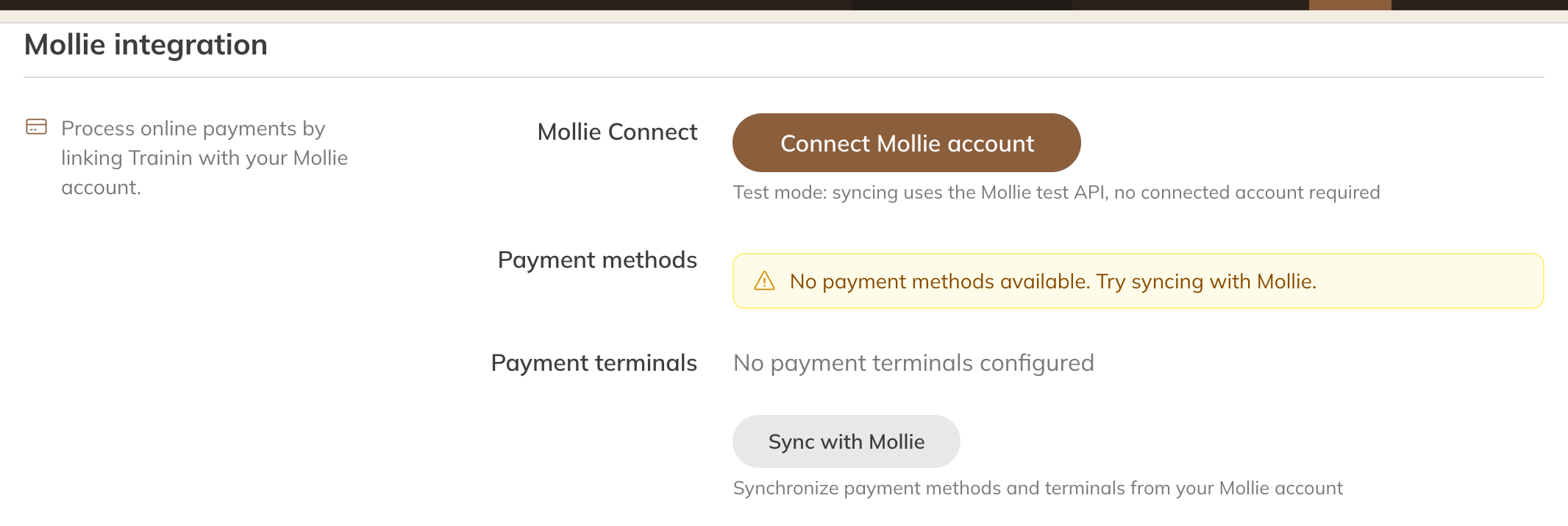
Mollie integration in the payment settings
If the connection worked, you see the label Connected under Status. If Mollie still needs information from you, you see a message under Mollie onboarding. Complete that in your Mollie dashboard.
4. Syncing
Click Sync with Mollie. Trainin then fetches your approved payment methods and your card terminals. You see them under Payment methods, split into One-off and Recurring, and under Payment terminals.
Do this again whenever you turn on a payment method in Mollie, or when Mollie has approved one.
Note: After syncing, is there a payment method under Recurring, such as SEPA Direct Debit? Then Trainin automatically sets Payment method for recurring payments to Collection. If you don't want that, set it back to Send payment link and click Save. See Collecting membership fees automatically.
Syncing doesn't work?
- Mollie refused the connection, for example because access was revoked in Mollie. The Connect Mollie account button then appears again: connect again.
- There is no website profile yet in your Mollie account. Create one in the Mollie dashboard and then connect again.
When is the money in your account?
Payments arrive in your Mollie account. In the Mollie dashboard you set how often Mollie transfers the balance to your business bank account.
Tip: You can find the transaction fees per payment method in Transaction fees.