How can customers view their strikes and penalties
Estimated Reading Time: 2 minutes
Applies to: Pro and Premium
Quick Summary
Customers can easily view their strikes and penalties directly inside their personal account.
This helps them understand when a no-show or late cancellation has resulted in a strike or penalty and keeps the cancellation policy transparent.
Why This Matters
Giving customers visibility into their strikes and penalties prevents confusion about cancellation policies.
It also encourages clients to cancel activities on time and helps reduce no-shows.
Step by Step Instructions
Step 1: The client can open their personal account
– Customers first need to access their personal profile within the customer app.
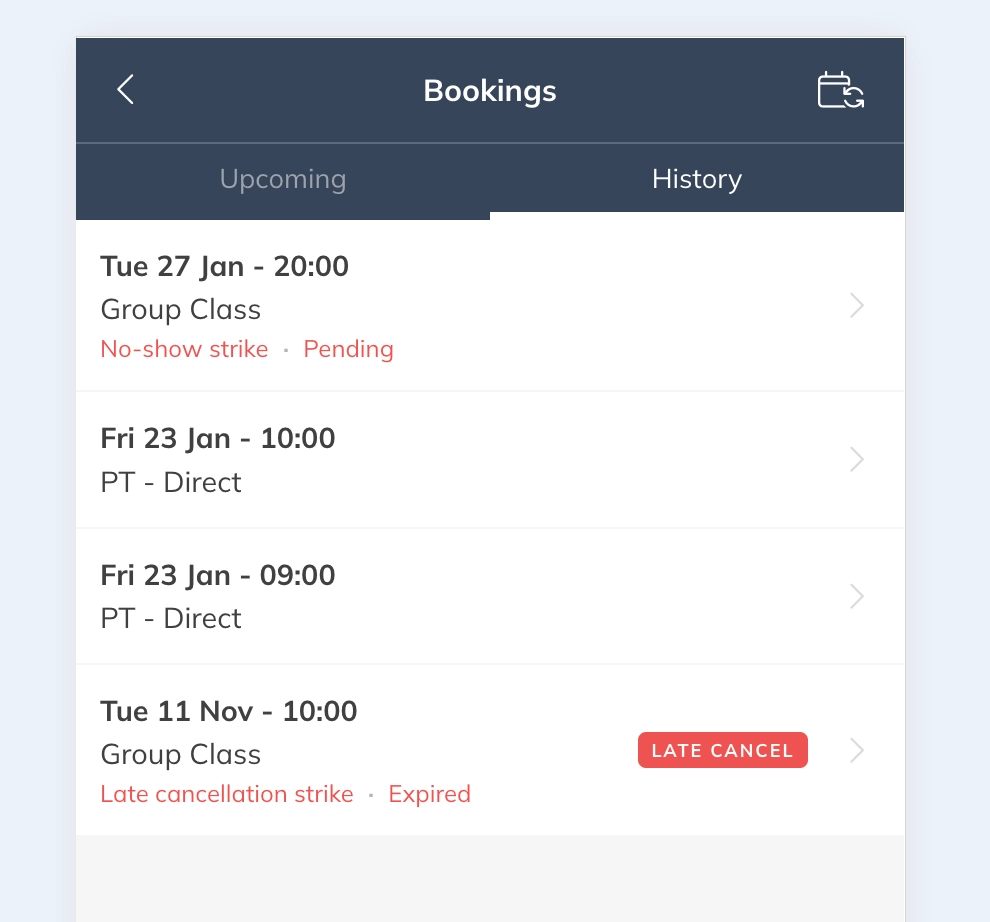
Step 2: Go to the booking overview: History
– Here customers can see the number of strikes they currently have and any penalties that were applied. Customers can review which Activities caused a strike or penalty and when it was applied.
Best Practice
Clearly communicate your cancellation policy to customers so they understand how strikes and penalties work before they book Activities.
This helps prevent misunderstandings and improves attendance.
Pro Tips
When fees are charged, these are visible at Products under the Payments tab.
Encourage customers to check their account regularly if they frequently book Activities with strict cancellation policies.
Transparent strike visibility often leads to better booking behavior and fewer no-shows.
Common Questions
Can customers see why they received a strike?
– Yes, the activity history shows which Activity caused the strike or penalty.
Do customers receive a notification when they get a strike?
– Yes, customers are informed when a strike or penalty is applied so they are aware of the policy enforcement.
Next logical steps
– How to configure automated Penalties for no-shows and late cancellations– How to disable penalties for specific Activities
– How to get insights and view reports on strikes and penalties
– How to manage penalties and strikes for a customer
– How to manage penalties and strikes for a customer