How to Connect Mollie to Trainin & Activate Online Payments
Estimated Reading Time: 6 minutes
Applies to: All Plans
Quick Summary
Trainin integrates with Mollie to securely process your online payments and transfer the money to your business bank account. The status of your sales will automatically be updated in Trainin.
Follow the steps below to activate payment methods and enable Automated Payments for your credit products (memberships / credit packs) and other sales.
Why This Matters
Mollie is our trusted payment provider for secure and reliable online transactions.
By connecting Mollie to Trainin, you can:
– Accept online payments for Memberships, Credit Packs, and one-time purchases
– Set up Direct Debit for Recurring Payments
– Monitor your finances within Trainin
– Receive payouts directly to your business bank account
– Control payout frequency from your Mollie dashboard
Step by Step Instructions
Step 1: Create your Mollie account: Go to Mollie > Create account
If you already have a Mollie account, skip to Step 3.
To process online payments, you must first create a Mollie account (you can go here to learn more).
– Complete your business verification.
– Add your business bank account details.
– Once approved, continue to the next step.
Step 2: Activate payment methods in Mollie: Go to Mollie Dashboard > Organization Name (top left) > Organisation Settings > Payments
– Activate the payment methods you want to accept.
– If you want to use SEPA Direct Debit, request this by clicking the plus sign on the tile with the white SEPA logo.
Trainin currently supports the following payment methods:
– Bancontact
– Belfius Pay Button
– Credit card
– Credit card - Recurring
– iDEAL (Wero)
– Pay by bank
– Paypal
– SEPA (Direct Debit, white icon in Mollie)
– SEPA (Bank Transfer, blue icon in Mollie)
– For more information about transaction fees, check this page.
Recommended setup:
– iDEAL (NL), Bancontact (BE) and Pay by bank (ES/DE) → ideal purchases of Credit Packs, Single Sessions and other one-time purchases.
– SEPA (Direct Debit) and Credit Card (Recurring) → best for Memberships or recurring payments.
– Credit card / Paypal → suitable for international payments
Step 3: Connect Mollie to Trainin: In Trainin Go to My Company > Settings > Payment Settings > Connect via Mollie
If you already connected Mollie before, skip to Step 4.
– Click the blue Connect via Mollie button.
– Log in and authorize the connection.
– Your Mollie account is now linked to Trainin.
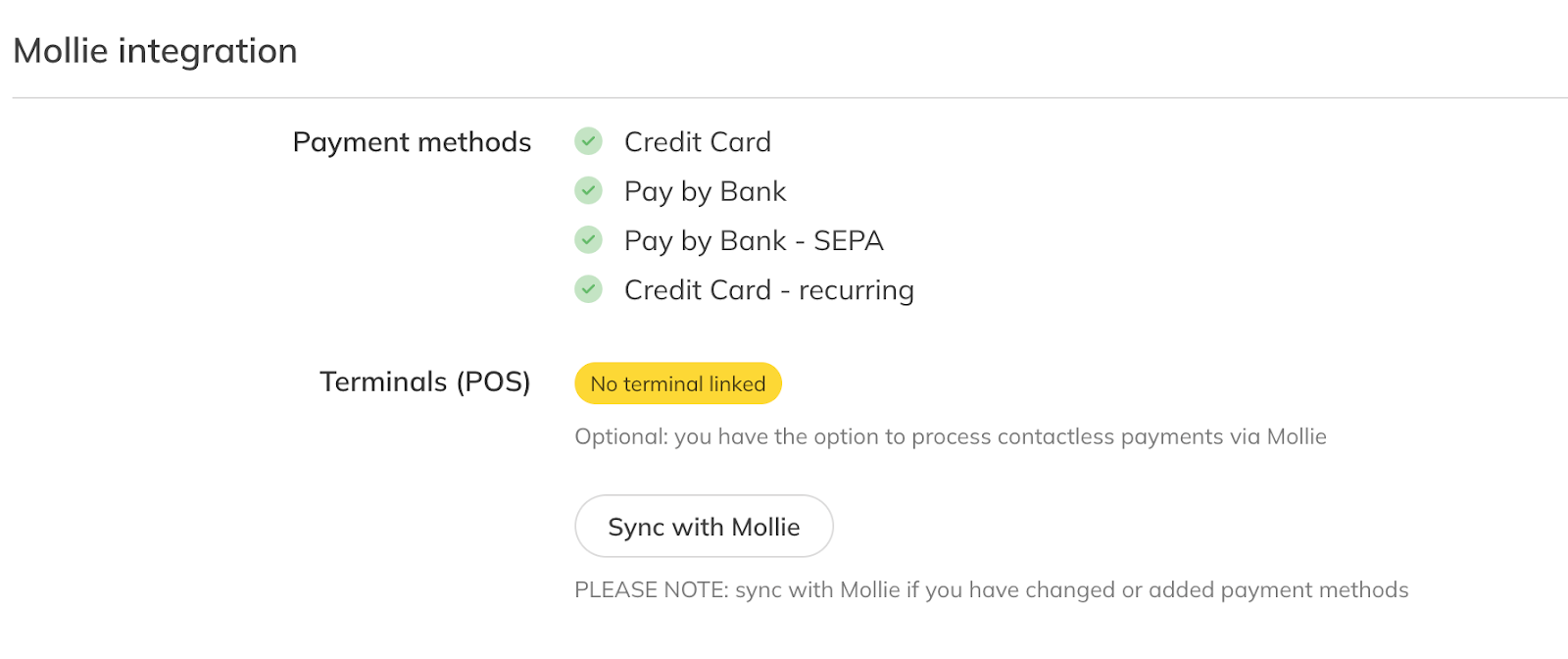
– If you activated additional payment methods after connecting, click “Sync with Mollie”.
– Approved and active payment methods will appear with a green checkmark in Trainin.
– If a payment method is still pending approval in Mollie, it will not appear yet.
Step 4: Manage your payout frequency: Go to Mollie Dashboard > Click on your Organisation name > Organisation Settings > Balance
All payments first arrive in your Mollie account.
Choose your preferred payout frequency:
– Every working day
– Weekly (fixed weekday)
– Monthly (first working day)
– You control when funds are transferred to your bank account. Please review the following article with detailed information on the payout information.
Best Practice
Activate iDEAL, Bancontact, or Pay by bank for low-cost one-time payments
Use SEPA Direct Debit for stable recurring payments
Always click Sync with Mollie in Trainin after activating new payment methods
Always test a payment before going live
Pro Tips
iDEAL, Bancontact, and Pay by Bank generally have the lowest fees
Use SEPA Direct Debit or Credit Card (recurring) to automate Membership payments
Keep Credit card or Paypal enabled for international clients
Common Questions
Can I use Trainin without Mollie?
– Mollie is required to process online payments. We only recommend processing payments manually for limited number of payments to avoid extra time invested in administration. Mollie supports your day-to-day activities by automating.
Why don’t I see a payment method in Trainin?
– The payment method is likely still pending approval in Mollie.
Can I change payout frequency?
– Yes, you can update this anytime in your Mollie dashboard.
Which payment method should I use for recurring payments?
– SEPA Direct Debit is the recommended option.
Do I need to sync payment methods manually?
– Yes, click “Sync with Mollie” after activating new methods to update Trainin.