How to set-up automated payments (i.e. Direct Debit payments)
Estimated Reading Time: 4 minutes
Applies to: All Plans
Quick Summary
Enable Direct Debit to automatically collect payments for Membership and installment-based products. Once activated, payments are deducted automatically from your client’s bank account using SEPA.
Why This Matters
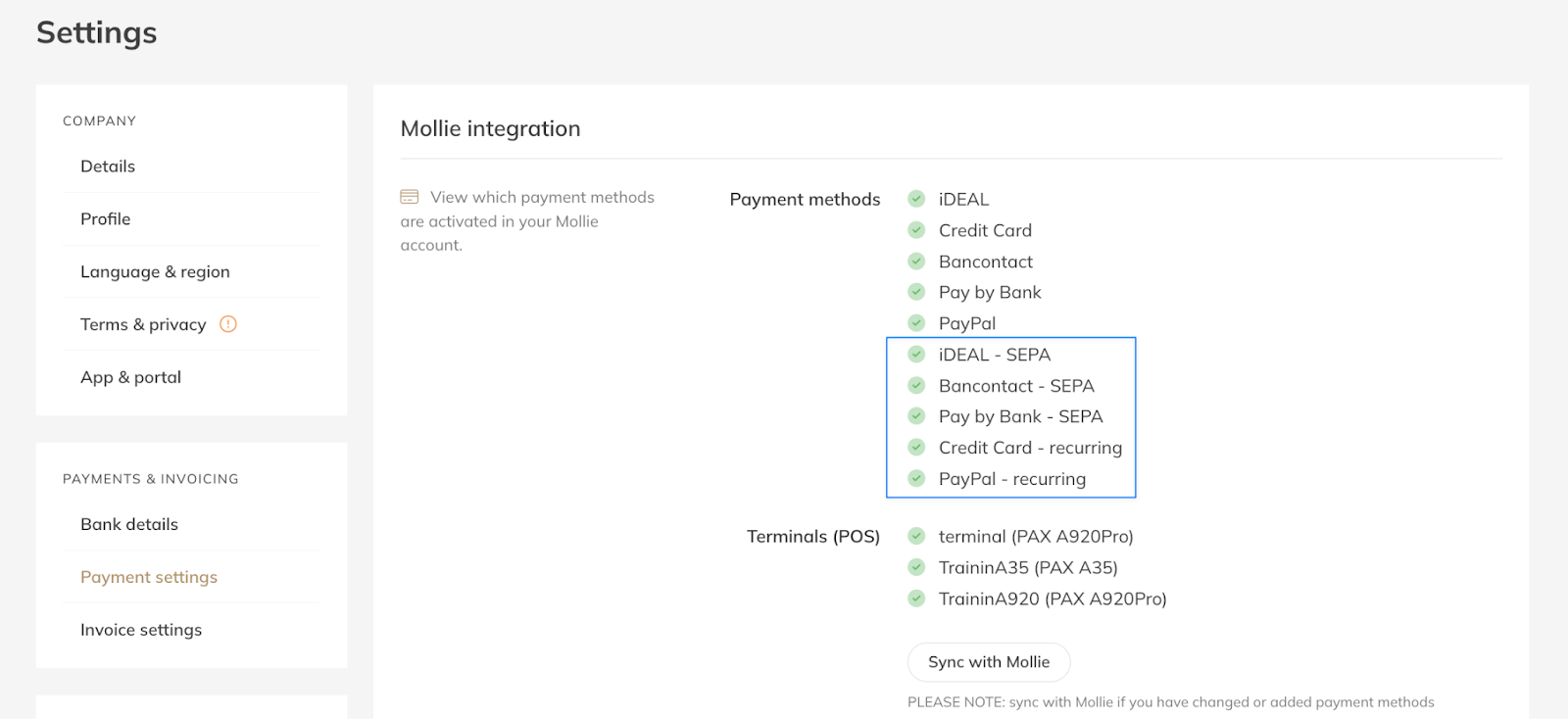
Why use Direct Debit? After activating SEPA or Credit card Paypal recurring payments in Mollie as one of your payment methods, you can enable “Recurring Payments” in Trainin for products with multiple payments (memberships, or packages with installments). The money will then automatically be deducted from the clients bank account without requiring any manual actions.
Did you not yet activate these payment methods please see step 2 in “How to connect and set up your Mollie account”. If you have activated SEPA correctly it will show as: iDEAL SEPA, Bancontact SEPA, Pay by Bank SEPA in Trainin. If you have Credit Card or PayPal recurring enabled, it will also show.
Step by Step Instructions
Step 1: Go to My Company > Settings > Payment Settings.
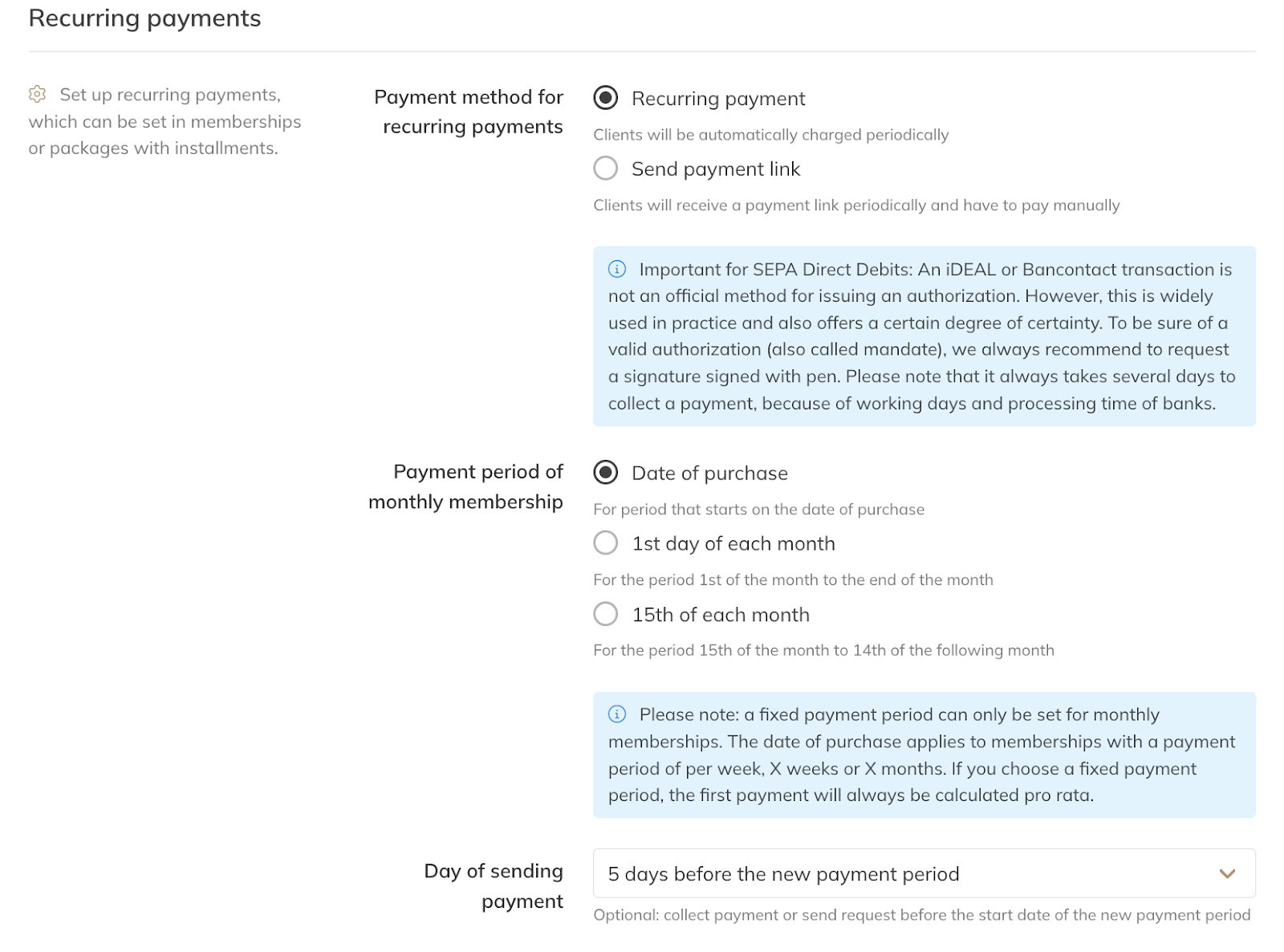
Step 2: Under Recurring Payments, choose the first option “Recurring payment” (for fully automated payments). This applies for memberships with recurring payments and for products with installments.
Step 3: The general settings for the recurring payments (such as the frequency and the amount) are generated by the product that the client has (My Company > Products ).
Step 4: You can choose the fixed settings for monthly payments, if you want the payment to repeat on the date of purchase each month or on the first day of each month.
For 4-week memberships or products with other settings this does not apply.
Step 4: Next, you can choose when payments should be collected (e.g., 5 days before the new payment period). Example: This means when an order period is from 1st of February till 28th of February, you can initiate the payment already on the 26th of January.
Please note: to set up the recurring payments a mandate must be created with the next payment after these settings are applied. With the next payment the bank details of the client will be saved in their client account (and in Mollie) to create the mandate and enable the automated payment for the next period. In practice: they will receive one more payment link / request and with that payment the automatic recurrent payments will start. When they purchase a product with these settings activated this will be done with the first payment.
This setup is commonly used for:
Memberships
Products with installments
Common Questions
How can I use SEPA Direct Debit?
– A SEPA mandate is required for Direct Debit payments.
What is a SEPA Mandate?
– A SEPA mandate is a document that gives you permission to collect payments from your customer’s bank account.
It includes:
Customer name and address
IBAN
Authorization confirmation
In e-commerce, this mandate is usually completed digitally during checkout. A physical signature is not required in this case, it should be clearly stated within the product description/confirmation and in your general terms and conditions what the clients is agreeing to.
You may only collect payments when the mandate is fully completed.
Helpful Mollie resources:
Do I need a signed SEPA mandate? How do I obtain the mandate?
– Yes, you need a mandate (permission from the client) to deduct money from their bank account. For online checkout flows, a digital mandate is sufficient. For offline agreements, a signed mandate is required. We recommend to obtain a signed SEPA contract with the customer.
Why is my SEPA Direct Debit failing? What can I do now?
– Common reasons include:
Incorrect IBAN details
Insufficient funds
Missing or invalid authorization
– Check Mollie’s Help Center for detailed failure explanations.
Now the payment is re-opened (or will be re-opened) in Trainin and you can choose what you want to do next, try to deduct the money again, send a reminder or share the payment link separately.
If the SEPA direct debit failed does that mean I pay the chargeback fee?
– No, that your SEPA failed does not mean you incur the chargeback fee. It depends on why the SEPA direct debit failed. Only for MD06 you will pay the chargeback fee, this is only when your customer deliberately reversed the payment from their bank account.
What is an example of what I can include to inform my client about the direct debit (mandate)?
– "By clicking [Place Order/Complete Purchase], I confirm I have read, understood, and agreed to the [General Terms & Conditions], the [Privacy Policy], and the [Membership Agreement]. I hereby authorize [Company Name] to send instructions to my bank to debit my account for the membership fees on a recurring basis for the duration of the contract, in accordance with the terms of our agreement." A contract with a wet-ink signature is always a good option as well.
Where can I find more information about SEPA direct debit?
– Mollie: https://www.mollie.com/growth/how-does-sepa-direct-debit-work
Now that Direct Debit is enabled, you can create or adjust your product settings to make use of Recurring Payments.
Related Articles
– How to choose and create the type of products you want to offer
– How to create Memberships
– How to create Credit Packs and Single Sessions
Trainin Quick Start Hub
Return to the full setup guide here.
If you would like to know more about our PRO, Premium or Add-Ons, send us an email at support@trainin.com.