How to enable and set preferences for the coaching and body metrics module
Estimated Reading Time: 3 minutes
Applies to: Premium / Pro or Starter with Add-On
Quick Summary
The Coaching and Body Metrics module allows trainers to track client progress, monitor measurements, and manage coaching data directly in the Trainin platform.
By enabling this module and configuring the preferences, you can define which metrics are tracked and how trainers and clients interact with coaching data.
Why This Matters
Tracking client progress is a key part of professional coaching.
By enabling the Coaching and Body Metrics module, you can:
– Track body measurements and progress over time
– Centralize coaching information inside the client profile
– Give trainers structured tools to monitor results
– Provide better insights into client development
Step by Step Instructions
Step 1: Contact the Trainin support team: send an email to support@trainin.com
– Our team will help enable the coaching feature in your account.
Step 2: Open the coaching settings: My company > Settings > Coaching
– This section allows you to activate the coaching functionality within your Trainin environment.
Step 3: Enable the coaching module: Coaching > Enable Coaching?
– Activating the module makes coaching tools and body metric tracking available in the platform.
Step 4: Define the coaching preferences: Coaching settings
– Configure how coaching data is used, including which metrics are visible and how trainers can record progress. If you choose to only give specific clients access, then you can active this in the profile of a client.
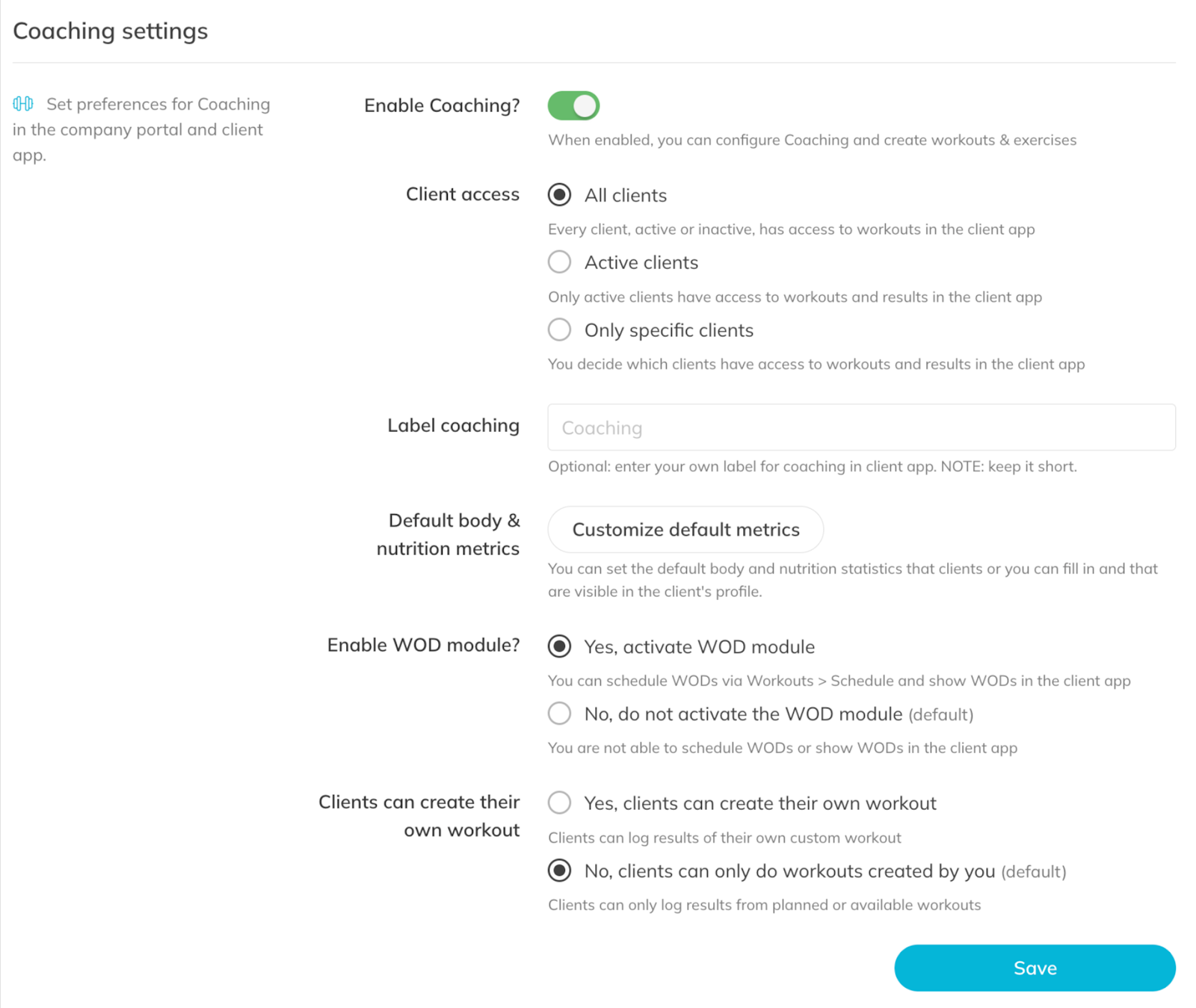
Step 5: Save the configuration: Save coaching settings
– Your coaching and body metrics module will now be active and ready to use.
Best Practice
Only enable the metrics that your trainers actively use.
Keeping the list focused makes coaching data easier to enter and improves consistency across trainers.
Pro Tips
Standardize which metrics your trainers track so client progress reports stay consistent.
Set if all clients or active clients can have access to coaching or sell it as an upgrade for specific clients.
Review coaching settings periodically to ensure they still match your training methodology.
Common Questions
Do clients see their body metrics?
– Yes. Body metrics are visible to clients, this might motivate them to keep going.
Can I customize the metrics we track?
– Yes. You can configure which body metrics are used inside the coaching settings.
Can trainers update client measurements?
– Yes. Trainers can record and update measurements directly inside the client profile once the module is enabled.
The Coaching and Body Metrics module is available in the Premium plan or the Pro/Starter plan with Add-On.
If you would like to know more about our Premium package or add-ons, send us an email to support@trainin.com.
Related Articles
– How to upload your own custom exercises for coaching
– How to create a workout plan template for your customers
– How to create a workout program for your customers
– How to assign a workout to your customers for training
– How to follow the activity and metrics progress of your customer
– How to create a Workout of the Day (WOD)