How to Manage Failed Online and Direct Debit Payments
Estimated Reading Time: 3 minutes
Applies to: All Plans
Quick Summary
Payments processed through Trainin and Mollie may occasionally fail. This can happen with both one-time online payments and recurring SEPA Direct Debit payments. Understanding why payments fail and how to resolve them helps you quickly recover revenue and keep client memberships active.
Why This Matters
Failed payments can interrupt memberships and impact your revenue. For SEPA Direct Debit payments, a failed transaction usually results in a chargeback that can still be recovered by contacting the client or sending a new payment request. For one-time online payments, following up quickly or asking the client to retry the payment can help ensure the transaction is still completed.
Failed SEPA Direct Debit payment
Step 1: Identify the failed payment in the finance overview: Go to Finances > Open
– Look for orders with a failed status or a chargeback label to identify payments that require follow-up.
Step 2: Open the order details to review the payment information: Go to Finances > Open > Select the relevant Order
– The order details show the payment status and the reason code provided by the payment provider. Please find the full overview of the reason codes on this Mollie page.
Step 3: Decide which actions to take regarding the failed payment:
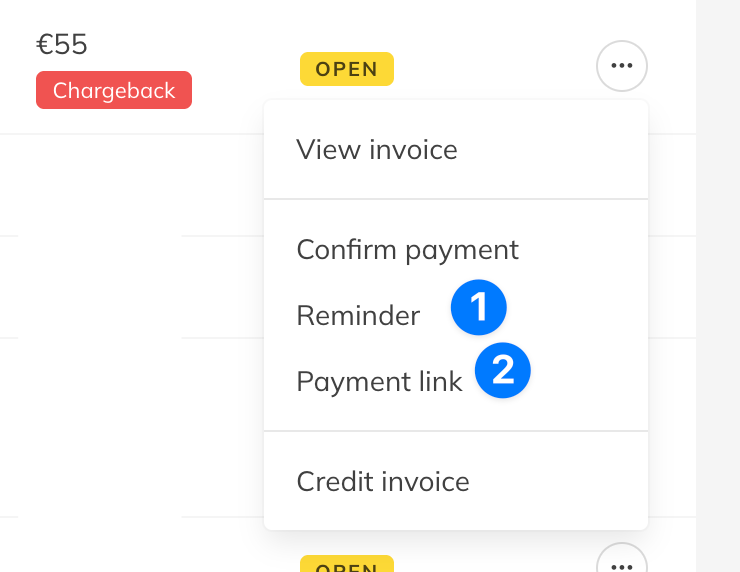
Option 1: Send a payment reminder with a payment link: Go to Finances > Open > Click the three-dot menu next to the Order > Send payment reminder
This allows the client to complete the payment using a one-time payment method such as iDeal/WERU or Bancontact.Option 2: Copy the payment link to share manually with the client: Go to Finances > Open > Click the three-dot menu next to the Order > Copy payment link
You can send the payment link directly to the client through channels such as email or WhatsApp
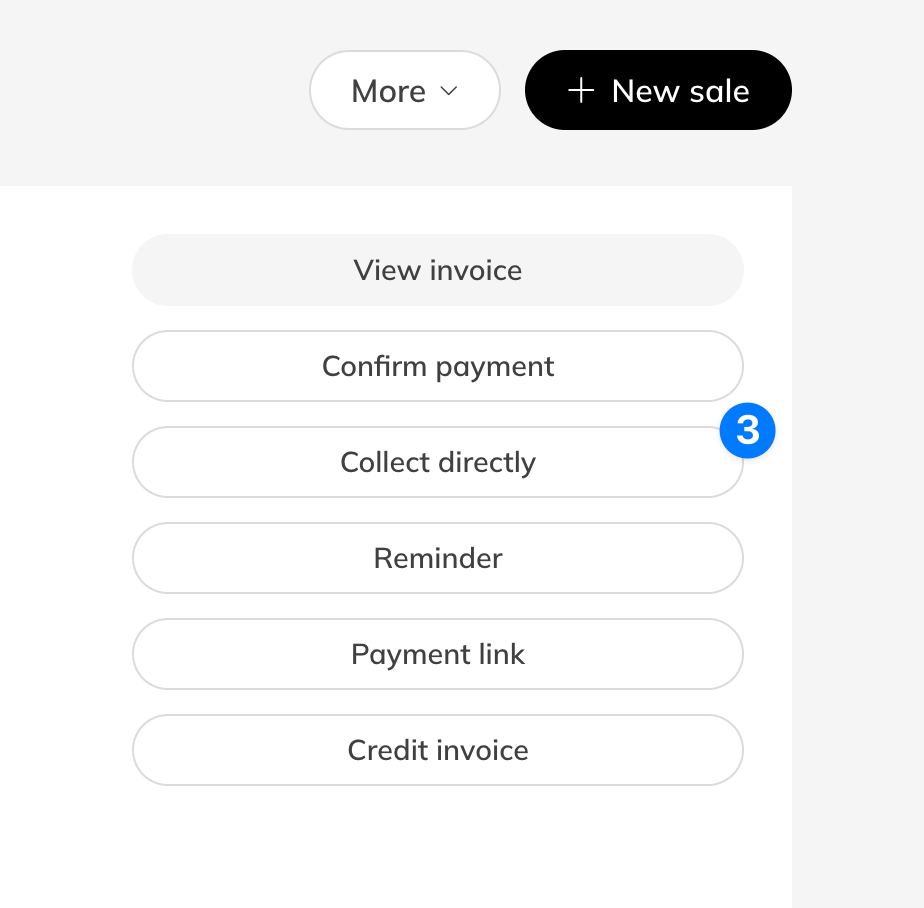
Option 3: Try to charge the client again via SEPA Direct Debit. Go to Finances > Open > Click the three-dot menu next to the Order >
Steps failed one-time payments
Step 1: Advise the client to retry the payment: use the existing payment link from the Order
– Ask the client to wait approximately 15 minutes and then try the same payment link again.
Step 2: Ask the client to purchase again if the payment link no longer works: Go to Shop
– The client can purchase the Product again directly from the Shop if the original payment session has expired.
Step 3: Cancel and resend an invite if the product was assigned by the business: Go to Clients > Select Client > Product > Cancel product > Send new invite
– This generates a new payment opportunity for the client if the original invite was not completed.
Best Practice
Regularly monitor the Finances > Open section to detect failed payments early. Contacting clients quickly increases the chance of successfully recovering the payment.
Pro Tips
If a client reports that a payment link is not working, ask them to wait briefly and try the same link again, as payment links may remain Pending for a short period before resetting.
When a Direct Debit fails, sending a payment link for a one-time method (such as iDeal/WERU or Bancontact) often resolves the issue faster.
Keep communication simple and friendly when contacting clients about failed payments to encourage quick resolution.
Common Questions
Why does an online payment fail?
– Online payments can fail if the client cancels the payment or if the payment session expires before the client completes the transaction.
What happens if the client closes the payment page?
– If the client closes the browser or does not complete the payment in time, the payment expires. The order will temporarily remain Pending, then return to Open once the session expires (usually this takes around 15 minutes).
What is a chargeback?
– A chargeback occurs when a Direct Debit payment fails or is reversed by the client. This will appear as Chargeback in Finances > Open.
Where can I see why a SEPA Direct Debit failed?
– The failure reason is shown as a reason code in the order details. These codes are provided by the payment processor.
Related Articles
– How to send a payment link or payment reminder to your customers– How to process a refund or a partial refund