How to create a workout program for your customers
Estimated Reading Time: 4 minutes
Applies to: Premium / Pro or Starter with Add-On
Quick Summary
Workout programs allow trainers to structure multiple workouts into a complete training journey for clients. A program can include several workouts and forms scheduled over a defined period.
Programs help deliver structured coaching while keeping training plans organized and easy to follow.
Why This Matters
A workout program helps clients follow a clear training structure instead of receiving individual workouts and helps you to automatise the workouts.
By using programs, you can:
– Guide clients through structured training phases
– Organize multiple workouts into one plan
– Deliver consistent coaching across clients
– Reuse proven training programs with multiple customers
Step by Steps Instructions
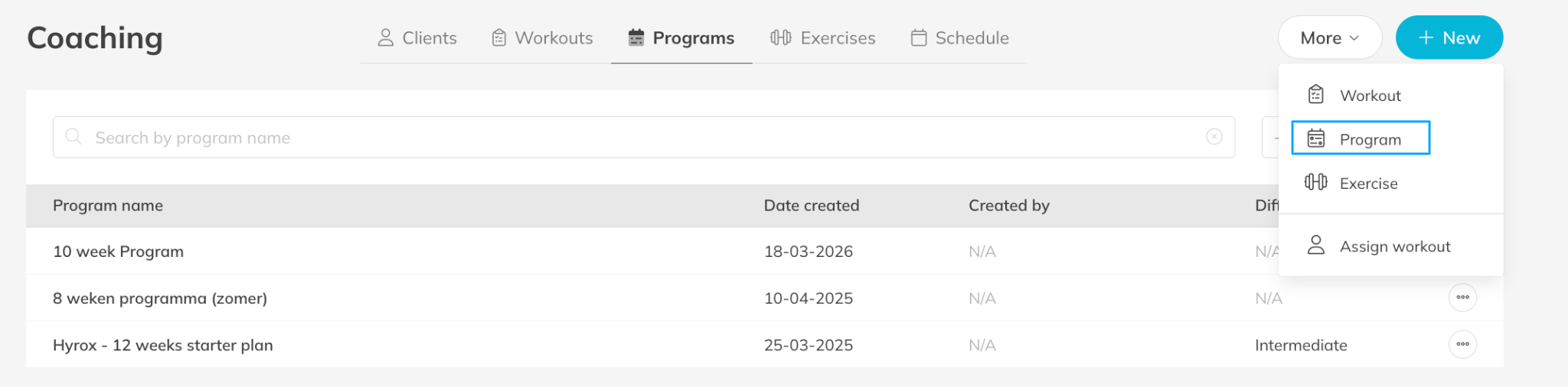
Step 1: Open the program management section: Coaching > Programs
– This section allows you to create and manage structured workout programs.
Step 2: Create a new program: Programs > + New > Program
– Enter a clear program name so trainers can easily recognize the training plan.
Step 3: Define the program structure: Edit Program > Program Details
– Configure the duration and difficulty of the program.
Step 4: Add workouts or forms to the program: Edit Program > Add Workout / Form
– Select existing workouts or forms that will be part of the program and choose a starting date and let it repeat during the program.
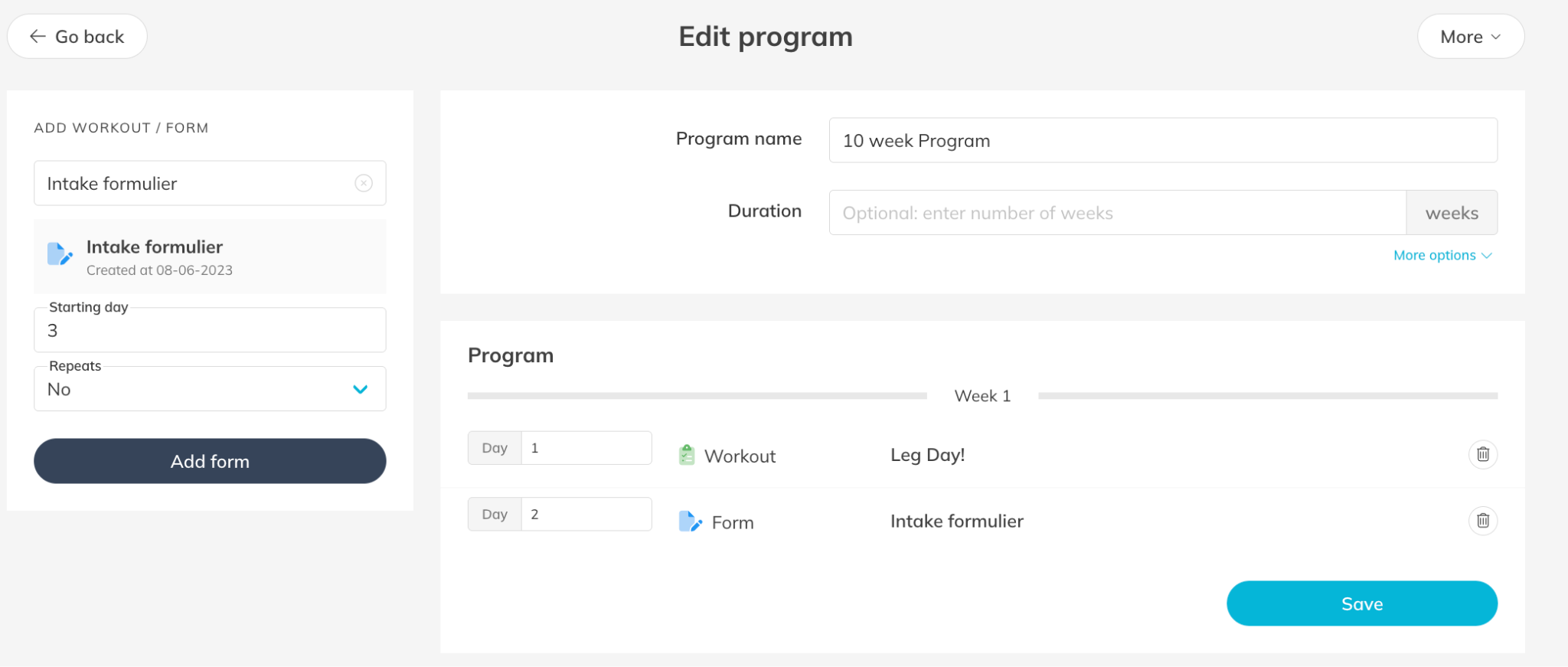
Step 5: Save the workout program: Edit Program > Save
– The program is now available to assign to clients.
Best Practice
Design programs around clear goals such as strength development, weight loss, or rehabilitation.
This allows trainers to schedule multiple workouts and forms at once, ensuring clients follow the program and make optimal progress.
Pro Tips
Start by building reusable workout templates before creating programs.
Use clear program names such as “Beginner Strength Program – 8 Weeks.”
Regularly review programs to improve them based on client results.
Common Questions
What is the difference between a workout and a program?
– A workout is a single training session.
– A program combines multiple workouts into a structured training plan over time.
Can I reuse programs for multiple clients?
– Yes. Once created, programs can be reused and assigned to multiple clients.
Can I edit a program after creating it?
– Yes. Programs can be updated at any time, and adjustments can be made based on client progress.
Workout programs are part of the Premium plan or Pro/Starter plan with Add-On.
This allows trainers to deliver structured training plans and manage client coaching inside Trainin.
Related Articles
– How to upload your own custom exercises for coaching
– How to enable and set preferences for the coaching and body metrics module
– How to create a workout plan template for your customers
– How to assign a workout to your customers for training
– How to follow the activity and metrics progress of your customer
– How to create a Workout of the Day (WOD)